Northern Peak HR

Loading

Digital Platform Services

One platform for daily safety, training, maintenance, and compliance

Bring inspections, maintenance, incidents, training, documents, audits, and corrective actions together in one place. Offline-first access keeps field teams working when connectivity is limited or unavailable.

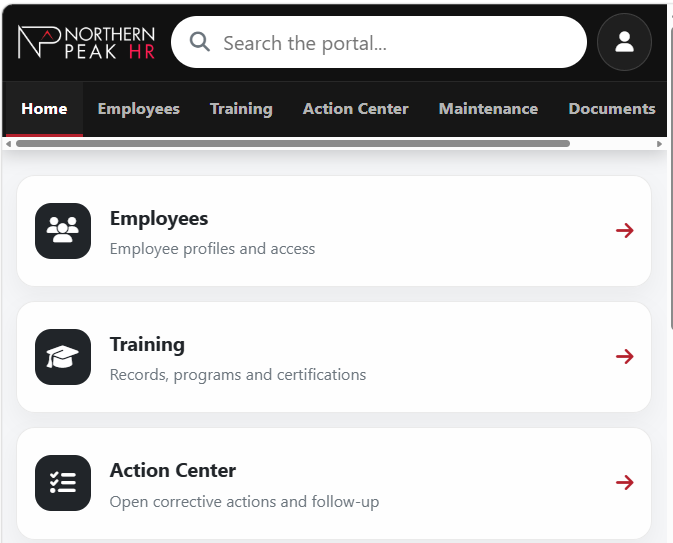
Northern Peak HR employee portal showing platform tools and navigation

Safety & Inspections

Complete daily safety checks and equipment inspections directly from the field.

Equipment & Maintenance

Track equipment condition, maintenance requirements and completed work in one place.

Incidents

Capture incidents, observations and supporting information while details are still fresh.

Training & Documents

Give field teams access to training records, procedures and important documents when they need them.

Audits & Corrective Actions

Manage audits, assign corrective actions and maintain clear accountability through completion.

Offline Access

Complete inspections while offline and sync the data when you reconnect to the internet.

Daily Safety

Safety is not only about what happens after an incident. The employee portal supports proactive, day-to-day safety participation through 360 Safety and other field activities.

360 Safety Observations

Record safety observations and build greater awareness of hazards and changing field conditions.

Daily Safety Checks

Capture routine safety checks and employee observations as part of normal daily work.

Hazard Identification

Give employees a straightforward way to identify and report hazards when they see them.

Safety Talks & Acknowledgements

Document safety talks and employee acknowledgements with a clear record of participation.

Pre-Job & Field-Level Safety

Support pre-job planning, field-level risk assessments (FLRAs), and other field-level safety activities before and during the work.

Supervisor Safety Interactions

Record supervisor and lead-hand safety interactions to strengthen visibility and accountability in the field.

Why it matters

Document proactive safety activity consistently while giving management better visibility into conditions employees are seeing in the field.

Equipment & Maintenance

Operators can complete daily equipment inspections directly through the employee portal, including while working offline. Equipment hours, inspection results, comments, failed items and supporting photos can be captured at the point of work.

When an inspection identifies a defect, the issue can continue into the maintenance side of the platform instead of being lost in a notebook, email or separate spreadsheet. Maintenance personnel can review the defect, create a work order, assign the work, document repairs, add photos and updates, and track the issue through completion.
01 Operator Inspection
02 Identified Defect
03 Work Order
04 Repair
05 Closeout
06 Equipment History

Operator Daily Inspections

Complete routine equipment inspections directly from the field, including while working offline.

Pass / Fail Inspection Items

Record inspection results clearly and identify failed items that require follow-up.

Equipment Hours & History

Capture operating hours and maintain a clearer history of equipment activity over time.

Defect Photos & Notes

Attach comments, photos and supporting details at the point where an issue is identified.

Open Maintenance Issues

Keep identified defects visible until the required maintenance work has been completed.

Work Order Creation & Assignment

Convert identified defects into work orders and assign responsibility for the required maintenance.

Mechanic Updates & Repair History

Document repairs, mechanic updates, photos and maintenance activity as work progresses.

Issue Closeout & Record Retention

Close completed issues while retaining the inspection and repair history with the equipment record.

Incident Reporting

When an incident occurs, collecting complete and consistent information early is important. The platform can guide an employee, lead hand or supervisor through the information required in the field and keep the investigation active in the system through review and completion.

Capture the Incident

Document the event and preserve important information while details are still fresh.

What this includes
  • Initial incident details and event description
  • Employee and witness information
  • Photographs of the scene and relevant conditions
  • Equipment and work-area information

Investigate & Understand

Keep supporting information connected as the incident moves through the investigation process.

What this includes
  • Investigation notes and supporting documentation
  • Training, qualification and related record review
  • Contributing factors and root-cause information

Correct, Review & Close

Carry the investigation through corrective action, management review, and final completion.

What this includes
  • Corrective actions and follow-up
  • Management review and completion status
  • Connected incident and investigation history

Corrective Actions

Identifying an issue is only the beginning. Corrective actions can be created from incidents, inspections, 360 Safety observations, FLRAs, audits, maintenance issues and other field activities.

Actions can be assigned, tracked, updated and closed within the platform, helping management answer a simple but important question: what was identified, who is responsible for it, and has it actually been completed?

  1. 01

    Identify the Issue

    Create a corrective action directly from the field activity where the issue was identified.

    What this includes
    • Incidents
    • Inspections
    • 360 Safety observations
    • FLRAs and audits
    • Maintenance and other field activities
  2. 02

    Assign Responsibility

    Assign the action to the appropriate person and maintain a clear record of who is responsible for completing the required work.

    What this includes
    • Defined ownership
    • Action requirements
    • Progress updates
    • Supporting notes and information
  3. 03

    Track Through Completion

    Keep corrective actions visible until the required work has been completed, reviewed, and formally closed.

    What this includes
    • Open action tracking
    • Status updates
    • Completion records
    • Management visibility

Training

Training delivery and employee training records can be connected in the same platform. Online courses can be assigned and delivered directly through the portal, allowing employees to complete required learning without relying on a separate training system.

  1. 01 Training Assignment
  2. 02 Online Course
  3. 03 Completion
  4. 04 Automatic Training Record Update

Course Delivery & Assignments

Assign required online training and deliver courses directly through the employee portal.

What this includes
  • Online course delivery
  • Employee training assignments

Completion & Record Updates

Connect completed training directly to the employee record and reduce the need for manual data entry.

What this includes
  • Automatic completion recording
  • Completion dates and expiry tracking

Certificates & Qualifications

Maintain supporting proof of training alongside qualifications and competency information.

What this includes
  • Certificates and proof of training
  • Equipment qualifications and competency sign-offs

Renewals & Training History

Keep renewal requirements visible while giving employees access to their own training history.

What this includes
  • Refresher and renewal requirements
  • Employee access to their own training history

Policies, Procedures & Safety Information

Policies, procedures, safe work practices, Safe Operating Procedures and Health and Safety Program documentation can be organized and maintained in one central location.

01

Policies, Procedures & SOPs

Give supervisors and employees access to current safety and operational documentation wherever the work is taking place.

What this includes
  • Health and Safety Program documentation
  • Corporate and site-specific policies
  • Procedures and safe work practices
  • Safe Operating Procedures (SOPs)
  • Emergency procedures
  • Forms, guidance documents and supporting records
02

Safety Data Sheets (SDS)

Organize SDS information so employees can quickly locate information about workplace products and chemicals.

What this includes
  • Searchable SDS information
  • Required and frequently used SDS documents
  • Offline availability for field locations
  • Access from offices, shops, yards and work vehicles
  • Access from field trailers and remote work areas
03

Field Access & Audit Readiness

Keep important documentation accessible where employees, supervisors and auditors actually need it.

What this includes

Documentation can be loaded onto a tablet and kept in an office, work vehicle, field trailer or other work location. Important information can remain available even when internet or cellular service is unavailable.

When an auditor or inspector asks for a policy, procedure, SOP or Health and Safety Program document, the information can be pulled up directly from the tablet rather than searching through binders, shared drives or multiple folders.

Replace Disconnected Processes With One Connected System

Many organizations still manage safety and operational information across paper forms, spreadsheets, email and separate systems. Our platform connects these processes from the field through assignment, follow-up and the final record.

Inspect it. Report it. Assign it. Train it. Repair it. Track it. Close it.

Take the first step

Start with the processes creating the most friction

You do not need to replace everything at once. Start with the processes creating the most paperwork, missed follow-up, or administrative effort. The platform can then be configured around your operation to fit its needs and improve operational efficiency.

Let’s look at what you are doing today and where the platform could make it easier.